
Holy, it’s felt like a million years, welcome back to another Month in Review, this is Gaian, reporting in on the happenings of Genome Studios in this million-year-long month.
Of all the things, I started this year with this…
When I got back to things now with the new year over and done with, I randomly scratched an itch that has been nagging at me for so long. LIKE SO LONG.
Camera Render to Texture.
It was something I used for Del Lago Layover and tried to prop up many times in the past. However, no matter what I did, it would immediately crash the moment I’d start the game. Rendering issues. To my experience, it was simply broken, as I literally never got it working once. But hey, might as well waste even more time trying to do it for the 5th to 7th time. I can’t remember what provoked it, but inside the image file the render texture was meant to write to, there is a “Format” value that allows you to determine the way the colour is stored and what colour can be stored.
If you’ve been following along the Genome Studios march for a while, you’ll know I’ve already had issues with this very image file format and its unspoken nuances. Well, I just started tossing random format types from a list into it and started running it, crash by crash. Finally, all of a sudden, the thing ran, and the image rendered. It was a miracle!
Turns out, and it’s not recorded anywhere, and not reported on in the graphics crash, you need to use the “RGBA” type formats. There are all sorts of naming types, numbers like 19, strange codified ones, and then these RGBA ones, which mean Red, Green, Blue, and Alpha (Transparency). Wellp, I guess that’s what it needed to run properly.
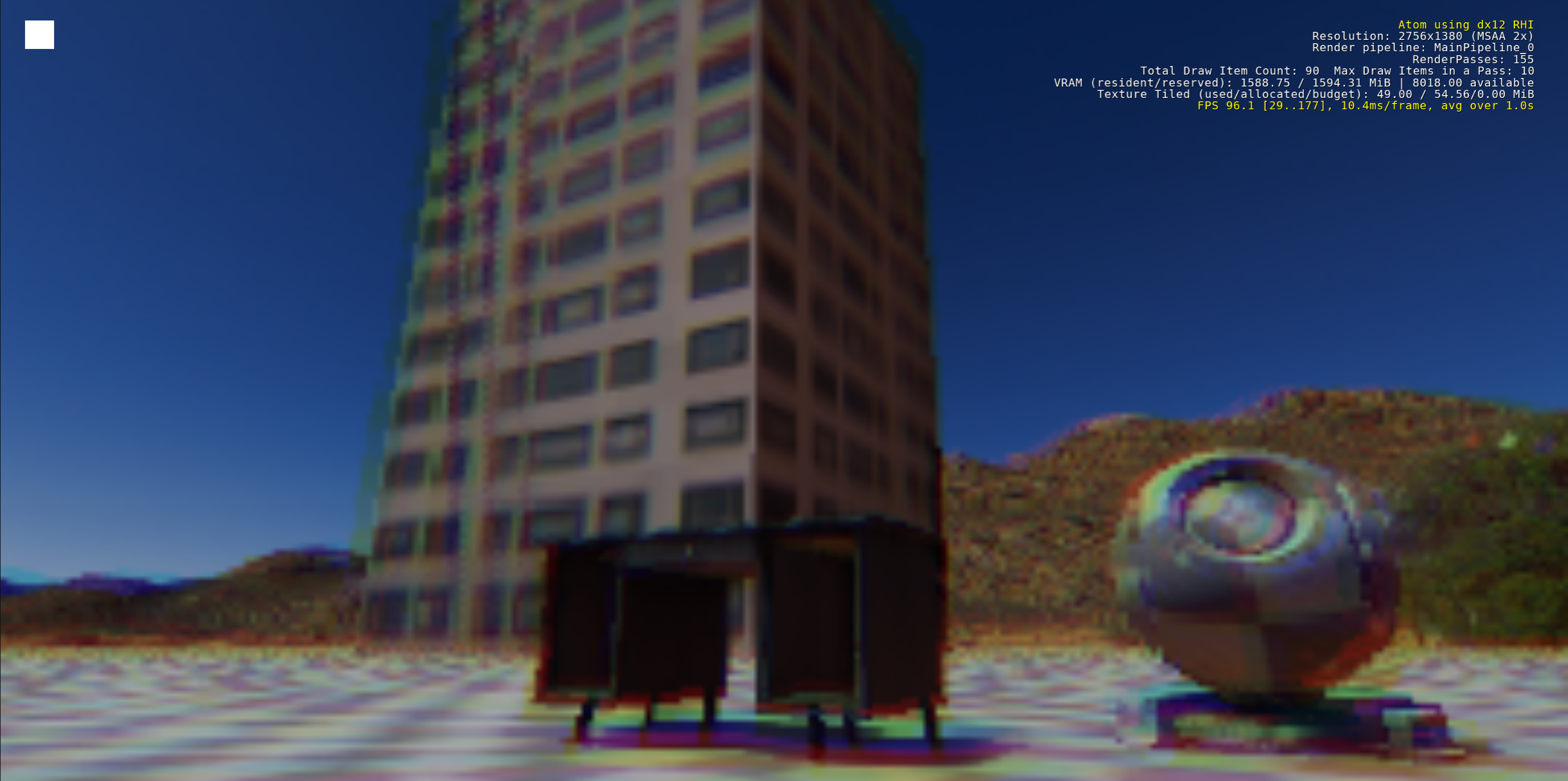
However, there was an added layer to this, in order to realize the final purpose of this usage. As it is, you can make things like split screen or window in window kinds of camera effects, but I am going for the ultra crunchy lo-fi pixellated camera of Del Lago. Getting the UI Canvas, which displays the rendered image, to actually be low resolution was a massive struggle. It does its best to scale up, and anti-alias and do all sorts of things to match your much higher window resolution. With some fussing, I was able to get it all working to spec. Although with anti-aliasing, I’m not sure how to remove.
Tada!
With that done, I decided to roar on back into…
Working on the server machine! I was purposefully really trying to keep the server stuff as side work to prioritize actually building GS_Play development forward, but when something bothers me, it bothers me until I just address it straight on.
I bought 64GB of Ram. I bought a 4TB M.2 SSD. I believe that investment in meaningful things is always worth it, and simultaneously, I believe in actually getting the things that accomplish the needs you’re setting forward to realize. Compromising and rolling along with a critically overused system was just not the purpose this machine was supposed to serve.
For now, however, I was going to leave the actual setup and migration of services and things for later. Moving things into the new hard drive, setting up memory allocation for 6 services, etc. It’s a lot of time to spend.
Demand is everywhere, and the work is never-ending. I need to jump around and not let things stagnate in wait for my attention.
So I went after something meant to explode the amount of output that we could do.
I started an open source Unity to O3DE converter!
Here it is in a VERY raw state.
This year, we’ve pivoted our horror game development efforts towards trying to build up the systems to port Del Lago Layover to O3DE for an actual production run of the game. Because the concept project exists, it allows us to worry less about new and unique content and instead, about getting everything up and ready to be able to actually deliver the experience.
Ideally, this means we can be submerged in some spooky and fun content that’s already been proven to be compelling, and then have more to work forward with. To let us dip our toes in the creative storytelling content side instead of having to leap into something cold turkey after… well… like a few years of raw technological problem-solving. While gainful, it’s honestly, really dragged me out of the familiarity of making stories and experiences.
Okay okay, so what does the converter do?
Right right. So I think it’s pretty smart.
First, you take assets you have and need to convert over. By scanning their prefabs, you can determine the gameobject hierarchy, as well as identify where common components are, like renderer, materials, colliders, rigidbody, etc.
Because the prefabs are already a compilation of all the pieces in one place, you can then start stumbling through things, like finding the actual mesh file or the textures used in the materials used in the prefab.
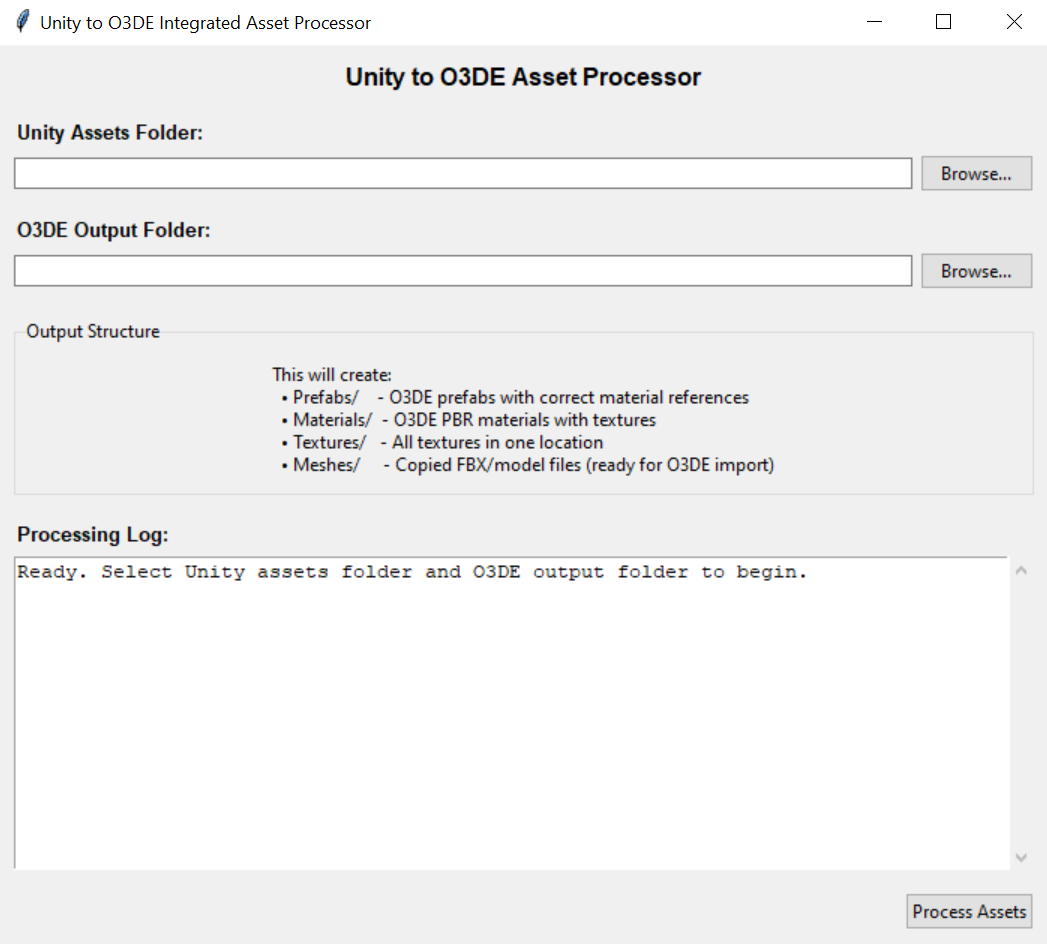
But this is just the setup pass.
Next, you can scan the Unity Scenes. Doing this gives you a map of EVERY game object and prefab placed in a given level. You get the unique overrides like position, rotation, and scale. Whether some pieces are enabled or disabled to start… the works.
By providing the array of prefabs you scanned earlier, the converter can then match the prefabs to game object instances in the scene and purposefully make your O3DE level reference prefabs as instances. Meaning, as you’d want, all the prefabs will still be prefabs in O3DE, and thus, whatever editing you do to the core prefab, EVERY instance in every level will update accordingly! This rapidly allows you to correct any lingering importation issues by hand.
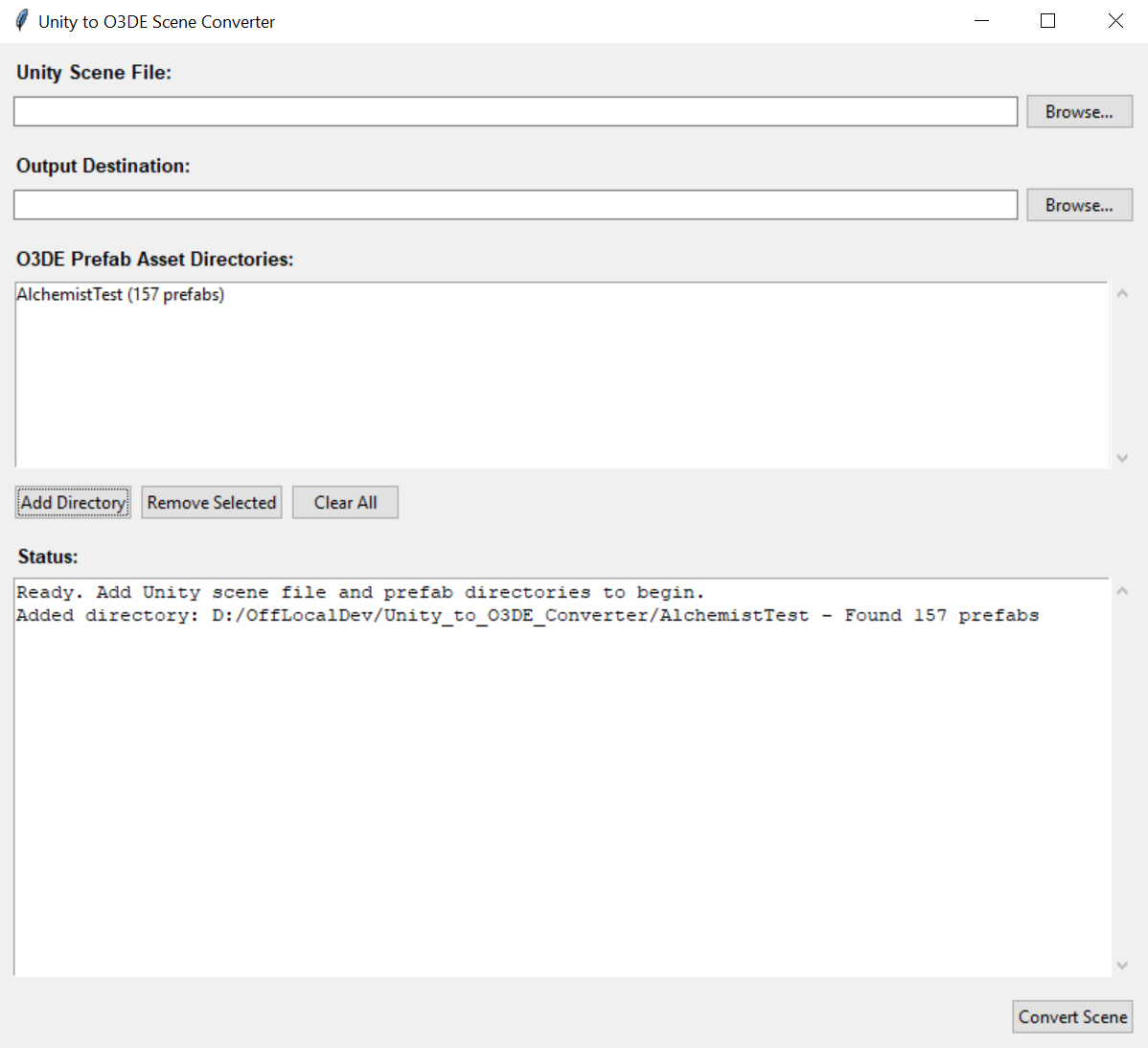
After some iterations, I got a proof together, at least.
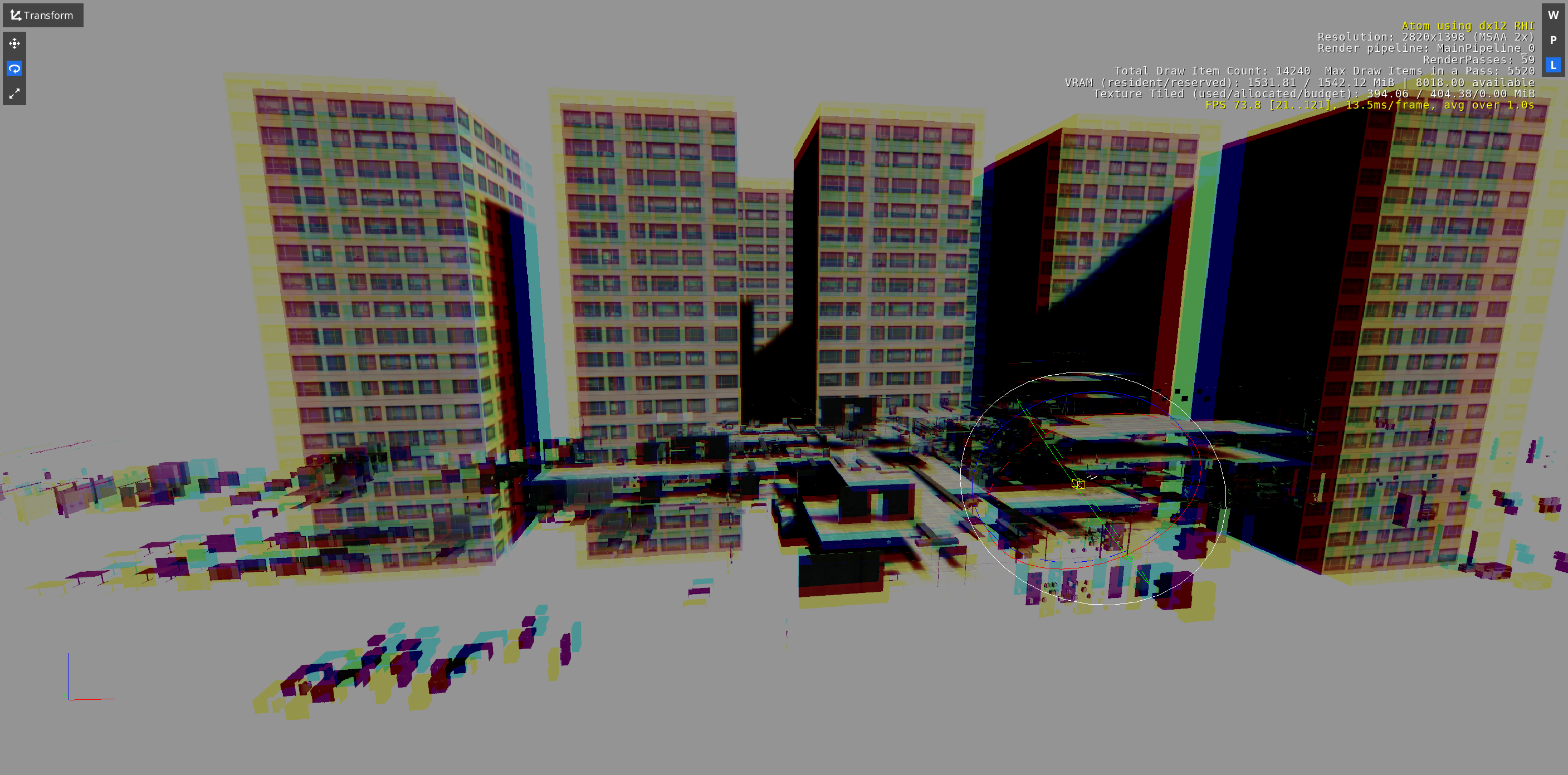
There are certainly some issues. Unity and O3DE seem to convert the coordinates of meshes slightly differently. Unity has a LOT of offsets in the prefab assets where the developers needed to manually offset every drawer in a desk, or every book on a shelf. In O3DE, some of those offsets were able to be set to 0, as they were already offset in the model file itself. However, for example, where you have duplicate drawers: 0 position for one drawer puts it perfectly in place (say the left drawer), but then, the second drawer at 0 is the left drawer, meaning you need to apply an offset to put it into the right drawer slot.
This is probably the single most problematic piece of the puzzle.
Otherwise, there are a lot of slight variations in language used for the two engines. Materials, while both being PBR in most cases, are SLIGHTLY different in final application. Unity has Transparency as part of its material colour definition. O3DE has its own specific “Opacity” section. Lots of the effort I was able to tackle was trying to better match the materials to each other. I think I got some good headway there.
One of the next real hurdles was matching the materials to the entity material component. The file structure for O3DE prefabs/assets is ‘pretty’ good. But there’s a sad disconnect. When using the “default” material section, there are all these details in the file that can be fudged. You can put “hints” in it to find the right material to put into the component. However, when you have an asset with multiple materials, you’re actually instead using the material slots portion of the material component. These are MUCH more rigid as far as I was able to glean. These slots actually utilize the direct UUID of the material AFTER O3DE imports it. This means the converter really can’t assume or fake anything, yet, it also cannot determine the correct UUID, as this is happening long before the assets ever enter an O3DE project, leading to its final processing.
Lots of little hurdles to clear, but I really think this is one of those random utilities that would allow a lot of interested adopters the means to rapidly pivot, or at least recover parts of their work to be less entrenched in their engine of choice.
This initial ‘figuring’ of Unity to O3DE will make it far easier to do the same for other engines, as once we find the parallels from Unity, the other converters simply need to satisfy their version of the same Unity systems to be able to still successfully match to O3DE.
Meanwhile, in the realm of aggravating Graph Canvas work..
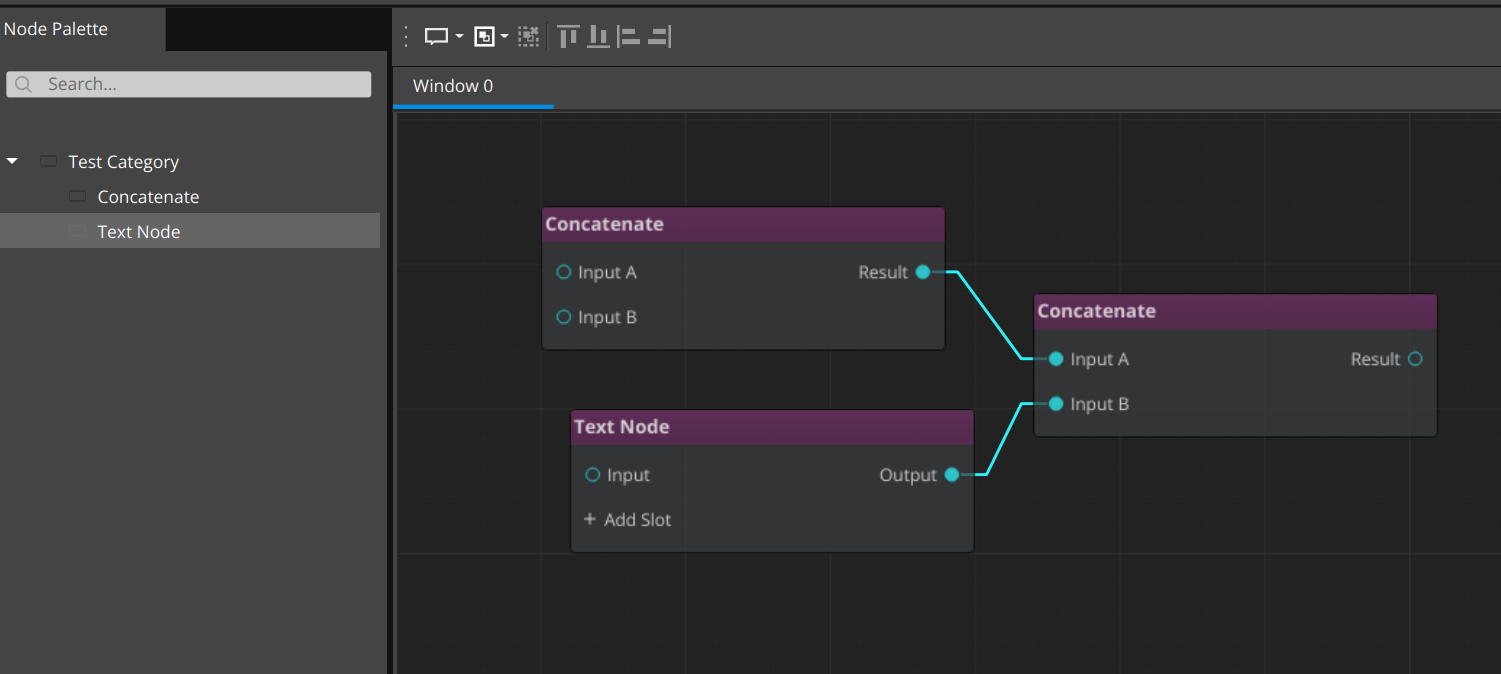
We finally got the system to register node types successfully and actually populate the graph!
Many thanks to Shauna for grilling that damn system until something could actually get manifested. Holy cow…
Moving forward, I began my journey into the horrible… The disgusting… The terrifying…
Studying Leadership and Team Management
But why? Isn’t totally rolling with things, being chill to a detriment, and just letting people drift ahead with absolute autonomy, completely fine for making a successful business?
No… yeah… no… mmm.. no… mm mmm…
Really, I’m joking, it’s something long overdue and something I still really need to spend more time on. While I have lived a lifelong journey of being self-directed, self-motivated, and clearly directed with full autonomy, it turns out others do not necessarily thrive in that…
I always strove to be hands-off and not micro-manage. But to those ends, I ended up on the opposite side of the same issue. Which ended up leaving people directionless for far too long. I totally wanted people to come to me and be like: “Yo, I am directionless.” and then I could be like “I got u fam.” and then we would resolve that right away.
No… yeah. no… ahhmmm.. mmm. no…
You need to be proactive, not reactive. Head things off early, sync regularly, and prioritize your team’s growth and thriving through regular check-ins to verify that they’re on course, and that you’re in alignment with their trajectory and contributing your part.
What I most covered, for now, is recognition and acknowledgement of effort and accomplishments, along with figuring out the cadence of check-ins.
This mostly added more tools to the belt and humbled me over the significance of certain efforts.
Internally, GS uses a #check-in channel that is meant for people to share their work in the day-to-day. It lets us see work is happening outside of ourselves, it gives an opportunity for the person to recognize their efforts, and it gives us all immediate means to celebrate each other. I definitely thrive in it. It also gives me ALLLL the fodder and timeline I use for these Months in Review.
But that is still a passive means of connecting and synchronizing with the team.
I read of “weekly” check-ins with the team. Meaning, one-on-ones (1:1). For our current purposes, that’s a bit excessive. But I opted for bi-weekly. Regardless, it’s still important to make these check-ins frequent. I’m sure it’s also valuable to pick the cadence based on the disposition of any given team member. It’s very clear what I’m doing, when and what I’m aiming to accomplish. It’s likely that I would raise a need to sync if it’s not happening enough. But someone on the flipside, making fewer, less detailed check-ins, less certain of themselves, horribly traumatized by other jobs that yell at you for being honest… they may need a bit more initiative from leadership to keep in a position of thriving.
So yeah, to all you indie folk, if you’re serious about actually having a team and studio, figure out your vibe and where you’re falling short, and have the humility and discipline to study how you can improve that. You don’t want to be a shitty employer/leader.
Speaking of celebrating!
I have some secret work we can’t quite outwardly share just yet. But as part of our efforts to significantly mobilize around our opportunities and projects we believe will get us on the board, Shauna has been utterly killing it on the project she’s been working on.
I’ve been on the edge of my seat, gasping for the opportunity to start using it and showing it off.
It’s one of those things where you REEEALLLY want to share progress and the excitement around it, especially for things like the months in review. But I have to hold my tongue for just a bit longer.
Ugh, it’s sooo good though.
Shauna, you’re killing it! Without a doubt!
Returning to the topic of legitimizing.
I threw together a pitch deck for Del Lago Layover, there was a pitch contest coming due in the next couple days here, actually, and I opted to give it a try.
This definitely spread me thin. I hate the self-promotion side of bizdev, at least when you’re in the domain of having to prove yourself with no strong striking metrics to back it up. It always feels a lot like lying, but not, and then simultaneously begging for enough recognition to be taken seriously. Both things that really crush my morale, and make me prefer to silently accomplish things until it’s simply undeniable: Where the self-promotion is actually apt and inarguable.
But, why I’ve brought this up.
It was too much for me to do.
With everything else going on at GS, this was a bit too much and definitely burdensome. I did a decent base draft, but I didn’t have the emotional resources to practice the performance, to time out the presentation, get feedback on the slides and info…
BUT!
You should still try for things. You miss all the shots you don’t take. So I, with great embarrassment, simply sent in my first draft. In this case, if you don’t get selected, you don’t need to attend or do anything more.
I think it’s worth mentioning that it’s not wrong to try and fail, or try to do the legitimizing, bizdev, emotionally taxing stuff, and still buckle and not get it all the way through.
Y’know. Try your best and actually aim to tackle things. But it’s not morally wrong to not do the best job, and accidentally spread yourself thin and burn yourself out.
This goal was a random side thing I wanted to try when I first found out about it. But life moves on, work changes, priorities change, and sometimes it’s just not going to work out.
It doesn’t de-legitimize you or your efforts to not be able to seize EVERY opportunity that comes your way. So long as you keep at it, there will be more opportunities to strive for. Crushing your spirit, burning out, and then giving up stops your chances at new shots altogether.
Speaking of new opportunities and new priorities…
We’re also seeing new interest and recognition of our GS_Play and O3DE community work! Exactly to plan; we’ve been supporting the community for the past handful of years, showing the accomplishments we’ve made using the engine, and have been continually present throughout all of it.
Like I said above, I’m a very self-driven individual, and this is how I fight my battles; steadily and continually. Because of that, I am, we are, that studio that everyone knows about, that always shows up, that’s sincere and clear in our mission and message out into the wide world.
By sharing this, I in no way am calling this battle “done”. Truly, it’s a measure that we’re moving in the right direction, that, much like finding out people read this month in review, people are actually seeing and recognizing the things we’re accomplishing and working to realize.
This IS that measure of why coming back over and over, even when you’re having a window of feeling terrible or defeated, creates opportunities that quitting stops.
We’re growing, improving, and showing how we’re overcoming our barriers and blockers. Showing that we’re solving problems we originally couldn’t through learning and optimism. With the aim of building up our studio ever more.
And it turns out, people see that, and remember that, and respect that.
I cherish it so much. So much of my life and creative work has been on the back of: “I’ll do it even if nobody is there to see it.” So finding out that people do see it is lifeblood for me.
Definitely, when it comes to recognition and celebration of your team’s accomplishments, recognize and celebrate your, and your studios triumphs as well. Everyone deserves celebration for working hard and coming out the other side.
Returning to the hard work part.
SO MUCH COOL SECRET THINGS! AHHHHH.
But I also ended up trying to tackle one of the more complex features, which I was very uncertain I’d be able to create.
Lo-fi voice synthesis using the Klatt speech synthesis method, created by Dennis Klatt. With credit, the systems necessary to make it possible are all free and open source! Really excellent because Klatt Voice is what drove Del Lago Layover character voices.
I certainly had ideas of things I “really” wanted when using the Unity Asset KlatterSynth, also used for the game Faith (it’s really good).
Now that it was up to me to make my own system of it for O3DE, as we have had to do for literally EVERY tool I ever used in Unity, I had some definite goals for it.
I mean, first, above all, is to have it work at all. That part was very unclear.
It was especially unclear because the accessible part of this was through a C-driven audio system, SoLoud. However, the built-in one, and the one we are using with GS_Audio, is Miniaudio… ANOTHER C-driven audio system.
Wellp. To get it working, we had to pipe the raw audio buffer from SoLoud INTO Miniaudio as a continuous audio event kind of thing… Probably not the prettiest, but it’s better that it works than be perfect.
Great, it CAN be. Now what do I WANT it to be?
I really, really wanted, above all, to be able to reach a more complex range of characterization among the cast of the Del Lago prototype. While the difference between Mr. Parker and Casey is clear enough, being different pitches. The differentiation between Casey and the other students was kinda negligable.
This time around? Hoooo boy… I am salivating over the kinds of performances and characterization we’ll be able to get to, using GS_KlattVoice.
You can do the standard pieces. Pitch and speed. Good starts for things. Having a slower speaking character vs a faster one can really define a character. Buuuut…
We also exposed two inflection dials. I can’t quite tell you what they are doing, but one is Vowel Harshness. From Dull/Muddy to Harsh. And the other I just called “Accent”, which isn’t accent like language, but accent of kinda.. the finesse or flourish of how the voice comes out.
This gets some VERY distinct changes in the voice; totally what I wanted.
I also exposed “word declination”, the sinking pitch over a word. This also meant that at a negative value the word would rise. This allows an interesting thing like the “popular girl where everything sounds like a question?” archetype.
Lastly, I exposed the actual waveform type that the synthesis builds from. Saw, Triangle, Sine, Noise. They all bring out a subtle quality that also adds great variance.
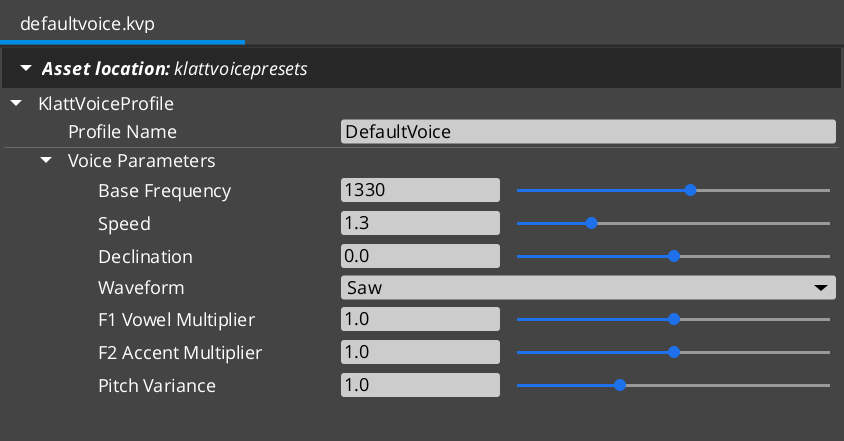
Now here’s where it starts getting real good.
Like the typewriter in the dialogue system, I added commands that drive changes in the voice in a word-for-word performance.
The interesting nuance of this is that it’s now actually making many little voice clips made one after the other based on voice property changes, then strings them together, sounding like one unbroken performance still.
This gets really cool because now you can set the last word in a sentence to rise, to actually make a question. You can lower someone’s pitch and change the waveform to make an angry guttural piece of a performance… It’s super super cool.
Check it!
Then, you wouldn’t believe what happened…
I FINALLY GOT MY ENTITY ACTIVATION SYSTEM MERGED INTO THE O3DE SOURCE CODE!
I GOT THE DOCUMENTATION FOR THE ENTITY ACTIVATION SYSTEM MERGED INTO THE O3DE DOCUMENTATION!
I AM A GAME ENGINE ENGINEER! AHHHHHH!!!!
This took so long, and so much scrutiny, proofing, testing and explaining. It’s very simple in its final application, but understanding it is really hard until you see the purpose, then it makes sense.
It helped a lot to add visualizations to the documentation.
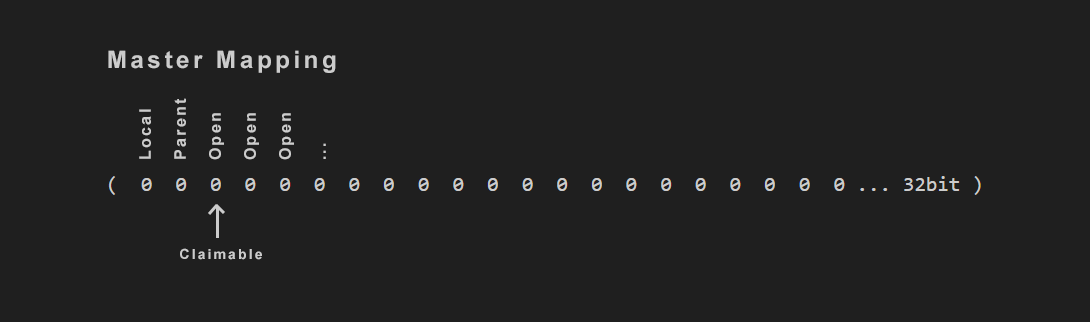
I also had to do something I’ve never ever done before. Actually edit and verify that the automated tests for the entity system work. Because they definitely were not at merge time. This was the final test of will and skill; make it work all the way, no compromises.
Now, from here on out, EVERYONE can start entities inactive, they can expect to disable a parent and have the entire hierarchy deactivate without any fail points in the components.
And any system can register to the Activation System and contribute its own activation flag, enabling things like a “Stream” flag that affects entities inside and outside of a streaming world. Something I definitely intend to make down the line in the GS_World toolset.
I’ve said it before, and I’ll say it again: I am very proud of this particular contribution. It literally affects the Entity class. The single most core molecule of the entire engine. Not only that, but there was very little impact on performance. It also drastically improved the quality of Transform usage. Another incredibly primordial piece of a game engine… It’s physical placement and rotation in the game universe.
I am very excited to see adoption as it comes out enabled in the Spring release of the engine: 26.05 (May 2026~). Once this becomes a forgotten moment, it will be at its best: Where nobody even thinks about it, it’s just a given for the engine, and everyone expects it to have always worked this way. We will have games coming together that much easier, and with plenty of exploits and cheats behind the scenes that contribute to the smoke and mirrors of the games. So exciting!
Quickly, before I proceed to the next big topic.
Because of this change in the public source code, I rolled out a new build of our internal GS_Play_Engine, an “Install” package of O3DE I covered last month.
This allowed me to test one piece of our automated engine build pipeline: Patching using deltas.
When I synced my engine, as the end user, instead of downloading the entire 3gb~ engine package, I downloaded a far smaller package of delta files that successfully merged it into my local install. Then, to plan, the project built in a few minutes, giving me the full, functioning Activation System in my project! Huzzah!
With the base functionality proven, now it’s just a matter of refining the system based on our needs. This gives us immense power to control engine builds and instances across our projects, as well as our clients!
Yuss…
Back to the big stuff.
I mean, it’s all big, all very exciting and rewarding, but bigger-er stuff.
I FINALLY returned to the last GS_Play work I was in the middle of… like in end of November.. Beginning of December…
On the docket: Cinematics.
Rolling on back to that: I had brought together the brunt of the dialogue system to properly speak, find in-world targets for speech bubbles, dialogue options, and proper rendering of in world dialogue elements. All working great.
However, this isn’t the only thing needed for basic cinematic performances.
Returning to the needs of Del Lago Layover, as a benchmark for basic, lo-fi, modest narrative gameplay experiences; I needed to create the feature I originally invented for GS_Play in the original Del Lago: Move to a mark.
Sounds hilariously simple, but in the age of Awaken Guardian I was only working with dynamic systems, real-time in-game, in-world gameplay. Nothing even remotely cinematic aside from a few camera changes and tweens.
For a narrative experience with basically nothing for complex gameplay, you need to be on the polar opposite: Controlled and infinitely repeatable performances and presentations.
It worked out great, because with the few bits I did do, Del Lago really paid off in the final experience.
So I went after it in our Dialogue system. Move to, path to, set record (save data), change camera, activate camera, wait all the way to the end of these things, immediately proceed before things end…
I started pulling together the simplest most primordial pieces, easily made.
But then to my horror…
I realized my dialogue system, while easy to author, was completely hardcoded at one junction in the background processes. This is in absolute conflict with GS_Play’s mandate to be highly extensible. This was a 100% must-deal-with blocker. As, even for me, the work necessary to add more and more actions to dialogue would be significantly dragged on by this. Let’s not talk about what an end user would have to do to make any additional changes. It’s baaad.
So, gotta learn more, figure things out. Be better than I was when this horribly hard-coded thing came out, and I felt like “yeah, dialogue, this is sweet!”
Then I came across something I’d seen used in the engine in the past but didn’t know what was going on: Dynamic class references in a variable. This is seen in the default Input system, where you can add keyboard/gamepad button bindings or joystick bindings separately. When you “Add Input”, this window comes up and lets you select one of them.
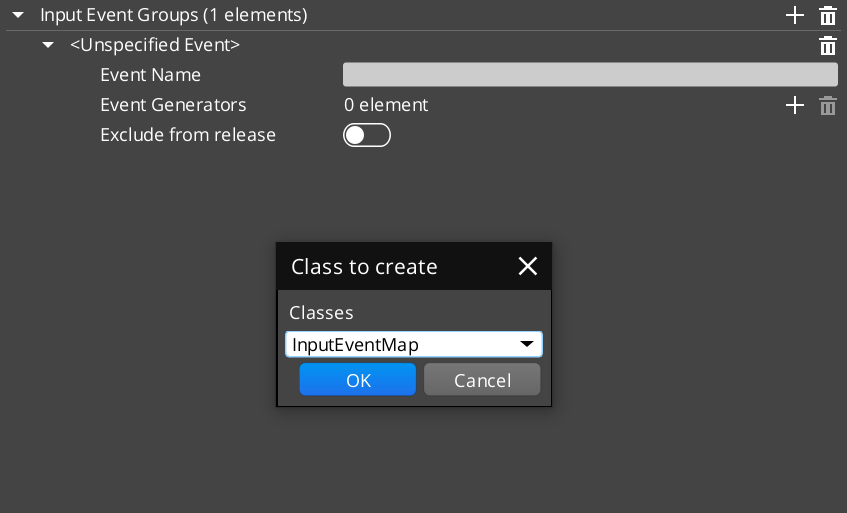
Turns out, this is done by declaring a base class, say “inputbindings”, then creating “Button_IB” and “Joystick_IB”. Instead of needing a Joystick variable, you can fill or leave blank, and the same for a buttons equivalent. You can make a certain arrangement of variables in the background that actually requests “any” inputbinding subclass.
This made things get REALLY cool.
Using this method, I got a registration system set up where you can declare dialogue system classes at startup, and populate a catalogue of registered actions. This can come from any gem or any project. Suddenly, all these hardcoded pieces are fully serialized classes that get their job done and simply add themselves to the pool. Along with that, because they register FROM their own gem, the moment you remove that gem, the system continues to work, but just without those particular actions.
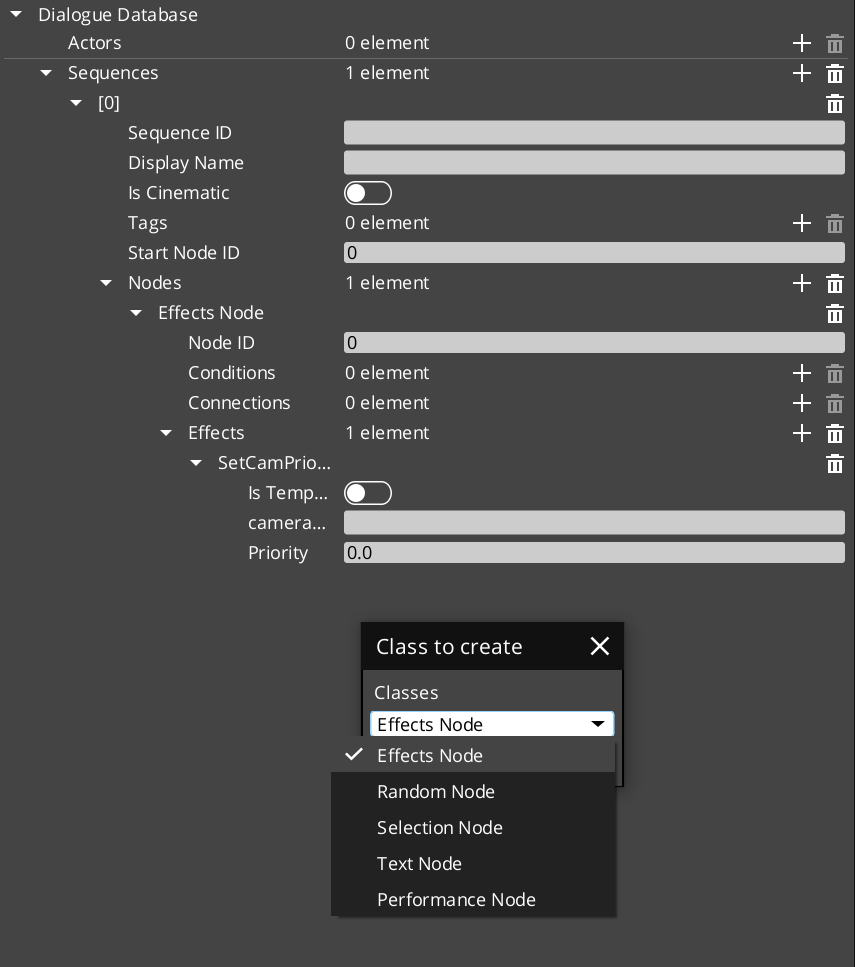
The speed of the workflow for adding new classes leapt forward. With a small overhead of setting up the registration system component, you can just slam out modular classes for the dialogue system from any gem or project, on demand.
This is a methodology I am so excited to deploy everywhere now.
Then things got even crazy-er cooler-er-er…
I’ve talked about it in the past, but I was also chipping away at another open-source feature for the engine. The Class Wizard.
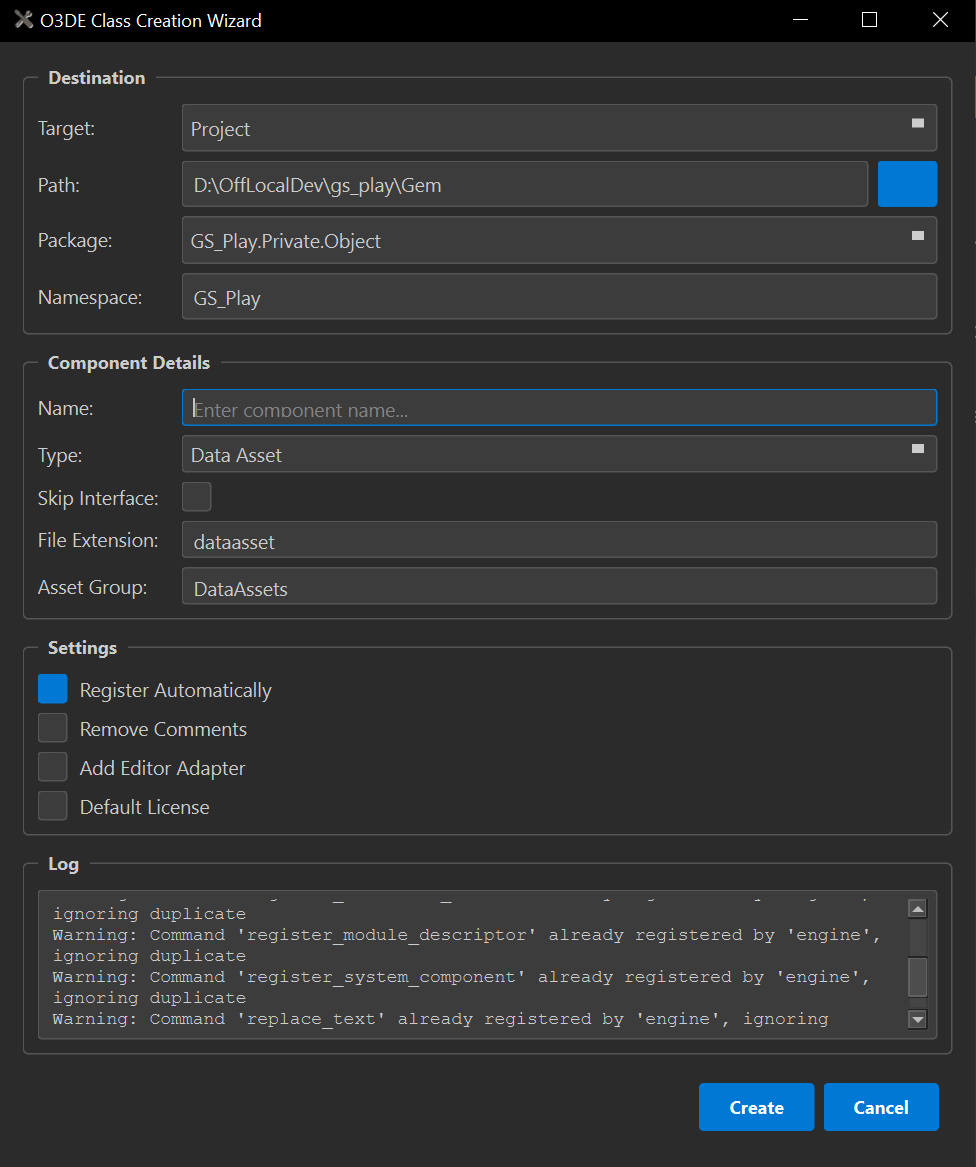
This is meant to take templates for making components, then automate them and provide a GUI to use instead of command line alone.
I got a lot of cool work into it, but by the time I stopped with it last, I had this itch of a feature that “would really improve things but isn’t critically necessary.”
I wanted to be able to add some additional JSON to the templates to basically say: “This template in particular is one for Class Wizard”, then allow the wizard to scrub through the templates and populate its template list with those dynamically, where it was originally hard-coded to static baseline templates I set up.
Good to start, but there were more details to this: I also wanted to scrub the enabled gems and project for their own /Templates/ folders and see if THOSE have templates that are ClassWizard enabled.
Awesome, I’ve got templates across the board. However, there’s one missing piece; this was the itch that I wanted to scratch.
I had to hard-code the actions used for the templates by hand in the wizard: Default, Level, System, UI components, and Data Assets.
The thing is, many of them have overlapping stages in their generation. Adding/skipping files, checking a toggle to do something or not… just general strokes to get the output to do.
To me, this was a missed opportunity. I already had dynamically populating inputs in the window. I already had stage-based processing… Why can’t I create a “language” inside the templates to be able to identify the steps needed in the template to fully process, just from reading the data?
So I got into it. You can define custom inputs, their names to use in the programming, and their types. Then you can implement commands and fulfil their parameter needs in a sequential order. One after the next, to the bottom of the command list.
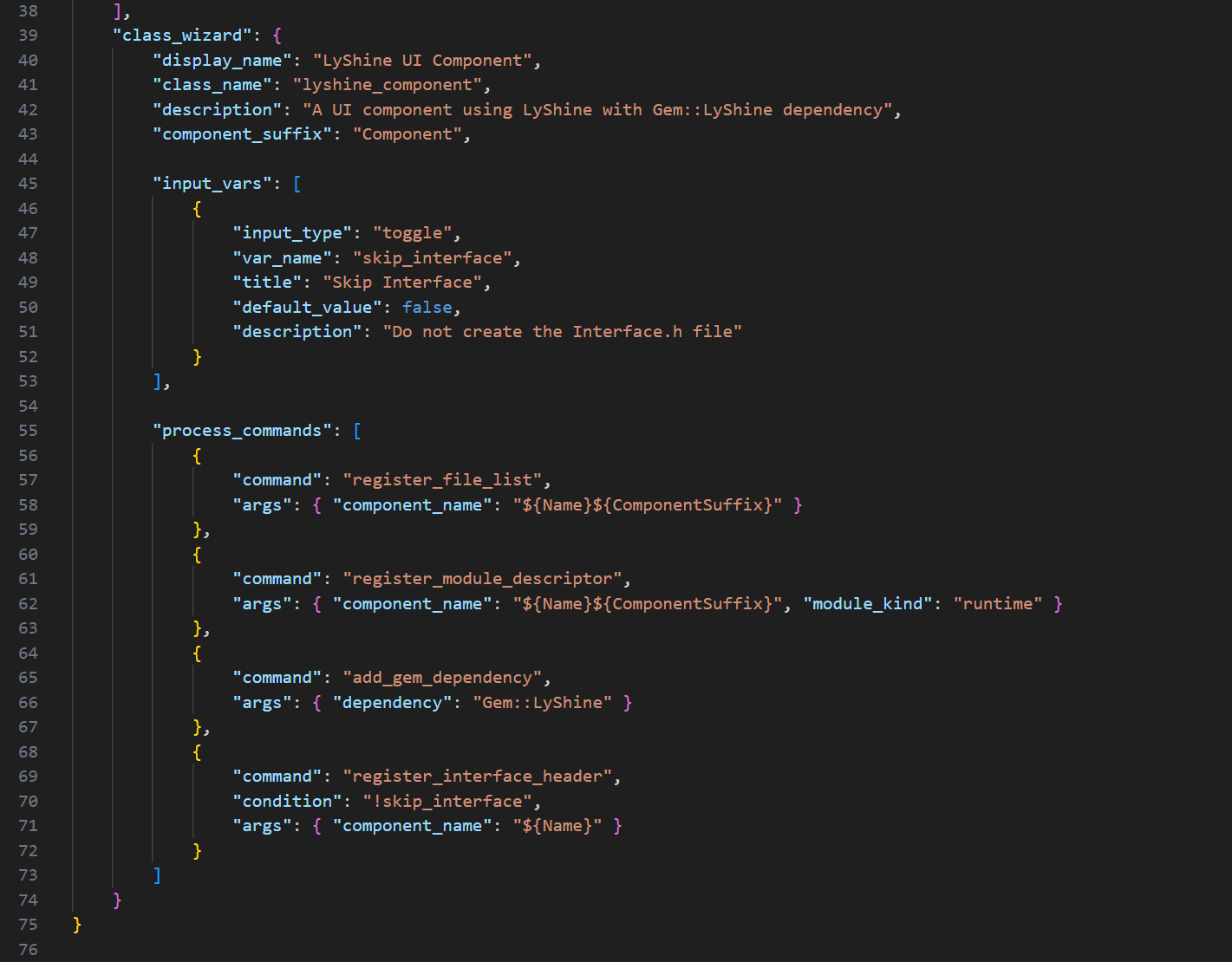
I got it working, and things started to come into frame…
By exposing the language to the templates, finding them anywhere, and decoupling the Wizard from the individual template types, the ability to make class templates explodes. You can make ANY templates for any classes with any number of files, any number of processes. It’s staggering what you can do.
As the final cherry on top, I decoupled the commands from the wizard, breaking them out into their own files. What this does is allow n number of contributors in the community or in-house to create any commands they want to introduce into the system without causing any conflicts from editing the root script. All while immediately enabling the addition of new commands that can be used across templates once implemented.
I started realizing…
EVERY extensible feature in GS_Play could have a companion Template defined that fully implements it dynamically, without any need to fuss with the minutia of what to include, what methods to override, etc… You can add all the comments and instructions necessary to operate it into the templates, and then remove them with the remove comments option of the wizard once it’s unnecessary for you to see the details of a generated class anymore.
The incredible improvement to workflows using this tool is staggering. Like. Orders of magnitude in what can be accomplished in rapid, rapid, succession. All with the ability to create new commands, even exceptionally niche things like registering dialogue classes to a system component, can be automated away dynamically and are only available when the Cinematics gem is enabled. Immediately clearing things out when disabled.
I hope it goes without saying that I am ready to just gun it through the entire GS_Play system as it stands right now and build every template I can possibly make. It’s so so so exciting.
But hold your horses…
It isn’t officially part of the O3DE system yet. It does still need some scrutiny and finalization, but it’s also dependent on the currently high-priority upgrade to the Qt GUI engine and the version of Python distributed by the engine at install.
You can merge this branch into your own and use it till then, but you’ll need to update your Python locally, and install other dependencies necessary to use it. I am already doing that.
Don’t worry, though, I will be GRILLING the community to scrub through this tool to get it in ASAP once that’s done. I can’t express the doors it opens for both highly advanced teams and projects, and hobbyists just wanting to poke into O3DE.
Then more amazing things I can’t talk about were made.
And they were so cool.
But then I wandered into territory untrodden.
Up till now, I hadn’t yet migrated my test project to use the GS_Play_Engine. The one that I was building and deploying literally for my own use. It was causing some confusion when I was finally trying it on a project that wasn’t bare, and had all the GS_Play gems enabled.
I had to revise how I set up my vscode, as the install does not have the source code (obviously, because that’s the whole point). But this also meant that you can’t set debug breakpoints in parts of the engine that are not exposed to you.
Additionally, it made the last pieces of the CMAKE Tools extension for vscode useless as well, as the only launch targets were for game runtime targets, not the engine as I needed. So I made a task to do that part too. I honestly want to remove the entire extension, but I’m scared I’ll break things. It’s so useless though…
Once the dust settled, more dust…
Great, I got vscode doing the bare needs to use the engine, but now I’m running into 900 assert warnings. They can be continued from, but alas, I could not ignore them any longer… This can, kicked down the road, has finally come due. It will not move.
So I had to actually resolve these issues.
One of the most critical ones, which I was very unsure of how to solve, was in Reflection.
I had already learned that you can replace the defaulted “reflection inherited from Component” with your parent class details. This makes the root reflection apply to your child, adding the child elements on top. This improved things a lot. But then there were instances where the classes were inheriting from a parent class, but ALSO a utility class that was adding additional reflection alongside the parent reflection.
Turns out you can add any number of classes to the reflect, just spaced out with a comma…
So simple, so sensible, but holy crap, I have gone an entire year without finding that out.
Time to grill every error of that type and correct it all. The nice side effect is that I had a very small, insignificant class I kinda wanted TONS of components to inherit from. But that would have added a 3rd thing to the reflection that I had no clue how to do correctly.
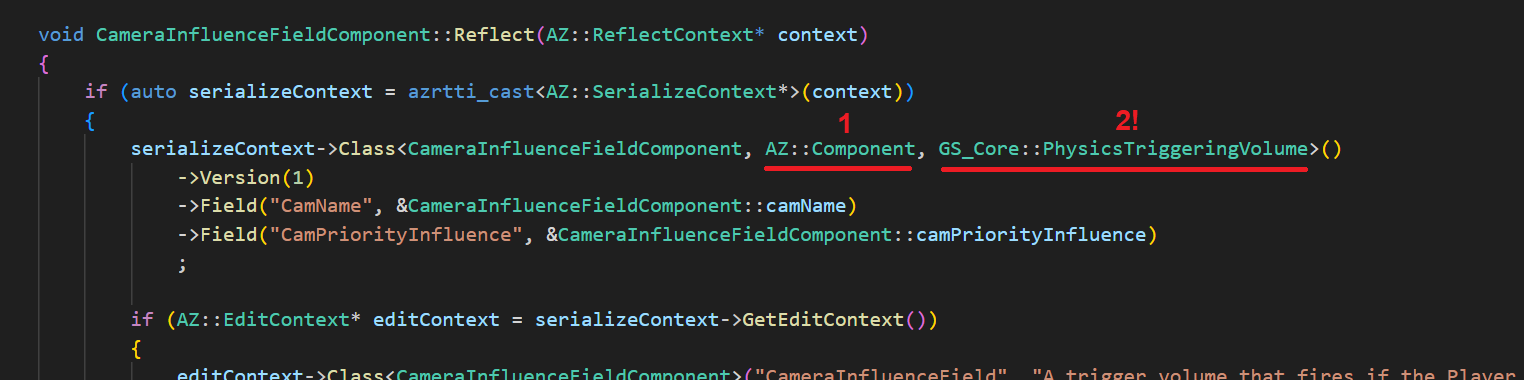
No longer. Phew.
Aside from a few other fopahs, I managed to clear out the vast majority of my issues just in that one new lesson.
One last error, that is killing me, is that when you have a Generic Asset, a file that carries random data you want it to, and the generic asset carries a DIFFERENT asset in its data. It’s technically considered dependent. But, up to right now, there is no simple means to declare that dependency. It’s painfully basic, and nothing that should need much, but the only solution right now is to create a completely custom asset building pipeline that, there, defines the dependency, making the whole system satisfied.
That’s quite frankly unacceptable. This is not a complex asset, literally why it can be a Generic Asset in the first place. So there needs to be a change.
Not out yet, and something someone (probably me) will need to pick up at some point. But there is essentially this exact “Generic Builder” utilized in the Atom render system. It’s used to generically process shader or render dependencies, or something… Whatever. It’s the thing we want.
So thankfully, there’s actually something we could simply copy-paste and make Generic for the Generic Assets in particular, and ideally staunch this issue from ever arising again in anyone’s Generic Assets.
Unfortunately, I have to sit in this one lingering assert until that Generic Builder can be made and deployed.
Surprising enough, this was very well timed.
As we’re finding growing interest in GS_Play.
We need to get our ducks in a row. While a roughshod push to get features through is good enough for internal use where you are also making your game in tandem with the tech, it’s a whole other picture to actually need to deploy it to someone outside of your purview and expect them to be able to use it at all.
Terrifying, but exciting!
With the end of the month rolling in, things started to get chaotic. We don’t really do the whole “End of Month Deliverables” thing. But there is definitely the idea of trying to bring things around to mark good progress… and be able to brag about them in the incoming Month in Review…
I was looking further into our server tools and services, excited to slowly transition to them to alleviate our dependence on subscription services.
Only to find…
OpenProject, a task and productivity manager, has all of its board types disabled… Must be a settings thing…
NOPE…
It’s blocked because it’s the free version of the software.
Hell no! Get outa here!
Dumped that tool immediately. That is unacceptable.
Did some research, then eventually decided to go with a very permissive and full featured alternative: Leantime.
If you’ve ever used ClickUp, or Monday, this is very similar to that. It has time tracking and other options not available by default in Jira. But still, kanban boards, Epics (Milestones/Goals) and Tasks. Not completely perfect, but a beautiful piece of software and very fully featured, for sure.
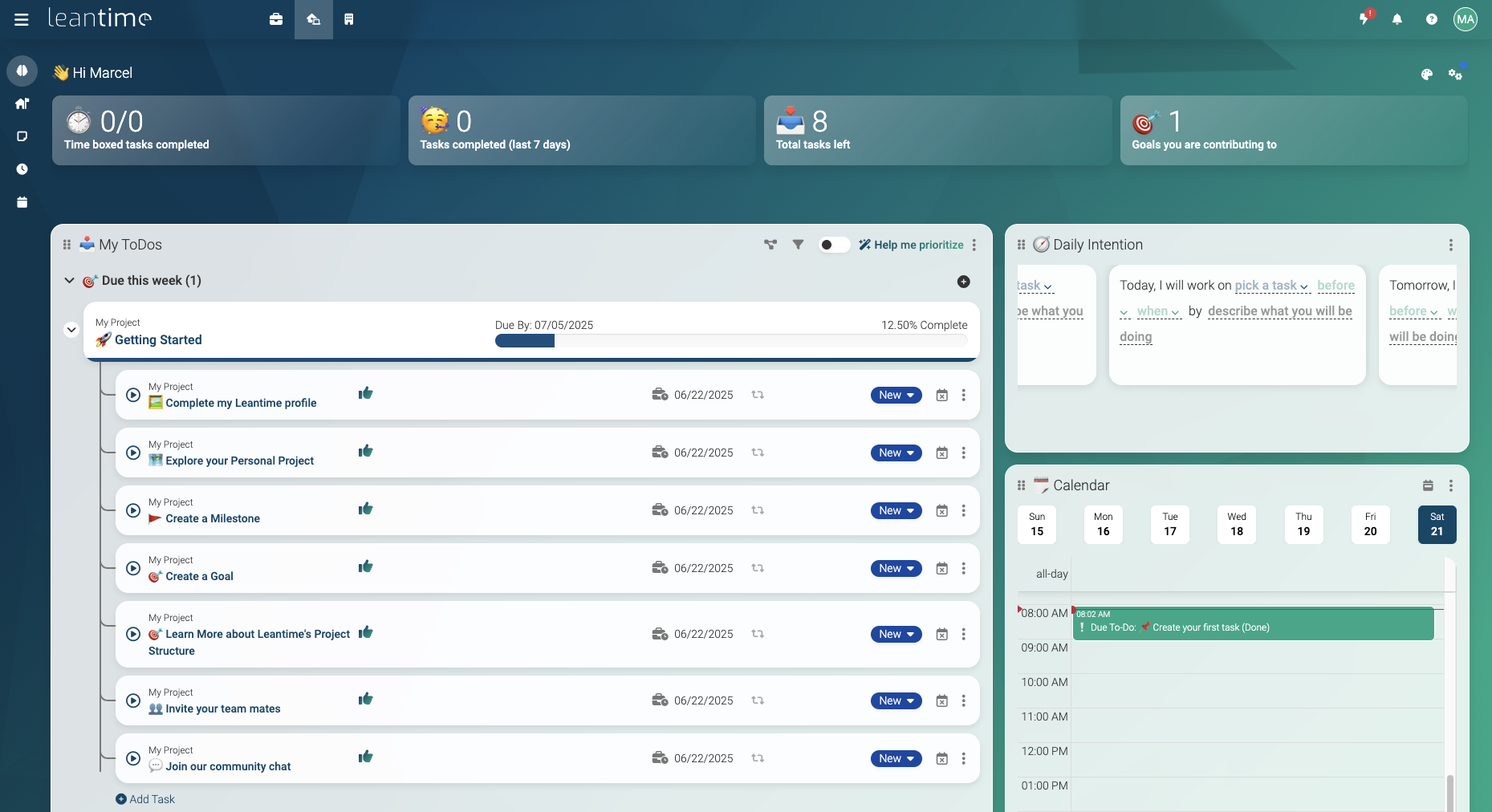
This also had me doing server things, so I made the effort alongside this to migrate my heavy storage services like NextCloud file server to our new 4TB hard drive, along with rebalancing all the services’ memory demand, now that we have double the original ram at 64GB.
Mostly very easy, just a bit time-consuming, and a little scary because you don’t want to mess everything up.
Getting back to the big things.
I’m getting increasingly freaked out about getting the broader stroke features of GS_Play out, in anticipation of working out a Del Lago Layover port. There are clear feature targets that I know intimately, but also it all needs my time and attention. As I get occupied with the granularity of certain features, which do need the attention to be sure, I am also not proofing major featuresets. A burden that is being exacerbated by the idea that you want the framework to begin serving others who want to get after some awesome O3DE game development.
To this ends, I stepped into a personal favourite.
My “Pulse and Reactor” system, part of GS_Interaction.
In the creation of Del Lago, I had a chase sequence that involved a monster charging down a hall that, for you, has a bunch of barriers that force you to swerve through them to survive. I made a little component called a Destructor, where, when the monster hits one of these barriers, it would destroy and launch a bunch of particles of luggage down the hall, showing you, Casey, the wave of destruction in your wake.
This became something I wanted to explore more, and touched a bit into when I returned to Awaken Guardian work later in my career, but it didn’t fully manifest.
The reason it stuck with me was that it had a very specific pattern. That of a collider appearing or moving into things, and then things explicitly awaiting that source to strike them and cause a reaction. This turns out to be exactly what hitboxes and body boxes are…
Which means that hit and body boxes could just be one more Destructor.
When I first entered O3DE, I was explicitly using the scripting, as the C++ part has a very high barrier to entry, and was quite intimidating, being C++ specifically. During that time,, I more formally conceptualized the system into Pulses, the emission of some property, and reactors, the things that, when pulsed, do a thing.
Well, the ebus system of O3DE worked exceptionally to these ends. You could make a pulse have any number of pulse properties, burning, physics launch, hitbox damage, laughter… Then the reactors can have any number of reactors.
Where the ebusses work into this is that the reactors didn’t need to all match up with the pulse source. You could have a block which can be launched, but not hurt and can’t laugh, and yet when the laughter portion of the pulse says: “Hey you, laugh.” The reactor just ignores it. Not having a listener for that particular message.
This creates an incredibly forgiving system where pulses can have extensive material properties that define it in full, and yet, anything that receives it doesn’t have to perfectly match it like a key to a lock. Nothing crashes, nothing fails. It’s beautiful.
Now in C++, nearly 3 years later…
I finally proofed out the minimum viable pulse system!
It’s exceptionally straightforward, but it’s also something that immediately came to me because… It now uses dynamically registered pulse property classes and reactor property classes! (The same as the dialogue system!) You simply give an entity a pulse component, or a reactor component, and then you load its guts with any property classes you want. Exactly like the originals, if something doesn’t align, it’s simply ignored.
As I learn the full breadth of O3DE as a software, these eureakas and triumphs grow my expertise that much further,, making all the tools here on after ever more powerful and adaptive. Certainly there will be moments where we return to older systems and better evolve them with the new functionality we know the engine is capable of, but one way or another, it’s just getting ever more juicier to make games using this toolset!
And: ALL OF IT CAN BE MADE INTO TEMPLATES! AAAAAAAA!
Now, here we find ourselves at the end of the month.
As always, thank you for following along in our journey.
You wouldn’t believe it, but just today some stupidly awesome things were made that I can’t talk about; it’s just getting better and better.
Alongside that, I got caught up in systems that were so deeply infuriating I was completely tilted for 3 days, impacting my productivity and mental clarity. But I’ll talk about that next month! Yay!
As always, we’re absolutely rearing to go. There are so many exciting things on our horizon, I just can’t get enough of it.
I hope to see you then. Same time, same place!
Till then!
Btw, you can now rep Genome Studios on Discord with our brand new shiny server tag! Every bit counts!

P.S. Did you know you can keep up with our Month in Reviews by signing up for our newsletter? Just check below!
Want to keep track of all Genome Studios news?
Join our newsletter!